 CarMood
Distance and time
In miles or kilometers, with the places where the trip started and ended.
CarMood › Mileage tracker
Trip log · iPhoneCarMood logs every drive by itself: a trip starts when CarPlay connects or when you drive away from where you parked, and it stops when you park. Mark trips as Work or Personal, add a note and export your mileage log to Excel.
Recording trips is free. Insights, iCloud sync and Excel export are part of CarMood Pro. iOS 26 or later.
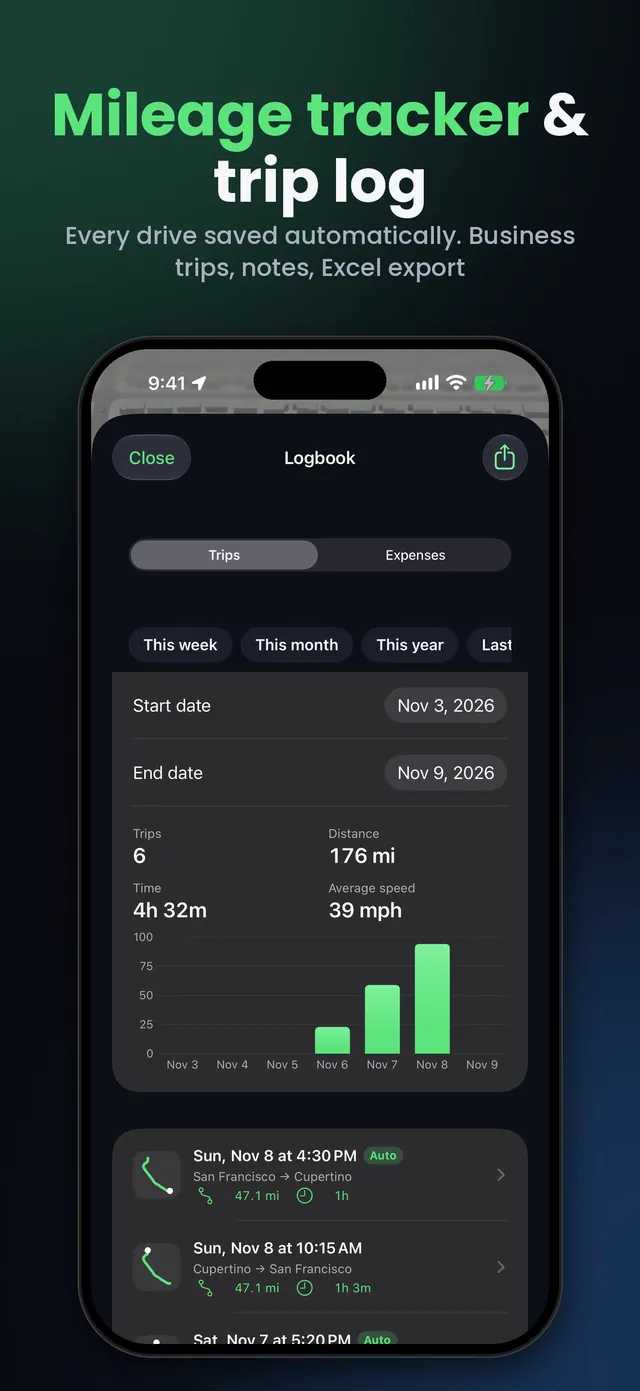
In miles or kilometers, with the places where the trip started and ended.
Swipe right to mark a trip, and add a note such as “Client meeting”.
Each trip remembers which car from your Virtual Garage it was.
Trips, distance, time and average speed by week, month or year, with a chart (CarMood Pro).
Trips, expenses and a monthly summary in one file, receipt photos as a ZIP (CarMood Pro).
Trips stay on your iPhone, and in your own iCloud with CarMood Pro.
Install CarMood, turn on Auto-record trips in its settings and allow location access “Always”. From then on every drive is logged by itself: a trip starts when CarPlay connects or when you drive away from where you parked, and it stops when you park. You don't have to open the app.
With CarPlay, the start comes from the same Shortcuts automation that plays your connected sound. You set it up once, while parked.
Yes. Recording trips in CarMood is free: every drive with its distance, time, places, purpose and note. CarMood Pro adds insights, iCloud sync and the Excel export.
Swipe right on a trip to mark it Work or Personal, and add a note: the client, the job or the reason for the drive. The Excel export then gives you a monthly summary with your total distance, your work distance and the work share.
It's a report for your accountant. Check your local tax rules for what a mileage log has to include.
Yes, with CarMood Pro. In the Logbook, tap the export button and pick a period: this week, this month, this year, the last 12 months, your own dates or everything. You get one Excel file with your trips, your expenses and a monthly summary, plus the receipt photos as a ZIP if you want them.
Yes. Your drives are recorded automatically, so you only mark the ones you drove for work and export them at the end of the month.
On your iPhone. With CarMood Pro they are also saved to your own iCloud, so they move with you to a new iPhone. CarMood doesn't receive your trip history, and trips older than three years are deleted automatically.
On an iPhone with iOS 26 or later. When asked, allow location access “Always”.
In CarMood's settings. With CarPlay, also add the connected sound automation once.
Your trips appear in the Logbook. Mark the work ones and export when you need a report.
Yes. A trip also starts when you drive away from where you parked, so CarPlay is optional. With CarPlay, the trip starts as soon as it connects.
Both. CarMood uses miles or kilometers, whichever you choose in the app.
It's a mileage log with a monthly summary you can give your accountant. Whether it meets your country's rules is for you or your accountant to check.
Yes. The same Logbook keeps your fill-ups and car expenses, and a fill-up's odometer is filled in from your trips.
Any iPhone with iOS 26 or later: iPhone 11 and newer.
Get CarMood, turn on Auto-record trips and stop writing down miles.